

How to link PAN with AADHAAR
Most of us know that we need to link PAN with AADHAAR mandatorily to continue filing income tax return in future. But most people still have not done that, as they don’t know how to link them. Believe me it’s easy than you think
The Central Board of Direct Taxes (CBDT) recently announced that the deadline to link PAN and AADHAAR has been extended to March 31, 2018, from the earlier deadline of December 31, 2017.
Govt. has given us more time to link PAN with AADHAAR but better you do it early to avoid your PAN becoming invalid.
Ways to link your PAN with Aadhaar.
For registered users at income tax e-filing website – www.incometaxindiaefiling.gov.in
Most of the AADHAAR are linked with PAN by income tax department, when we filled income tax return in the previous years.
You can check if your Aadhaar is already linked to your PAN by visiting the income tax e-filing website www.incometaxindiaefiling.gov.in
Login to the website by entering PAN (User ID), password and your date of birth. Once you are logged in and your account opens, click on ‘Profile Settings’ tab and select the last option ‘Link Aadhaar’. (image shown below)
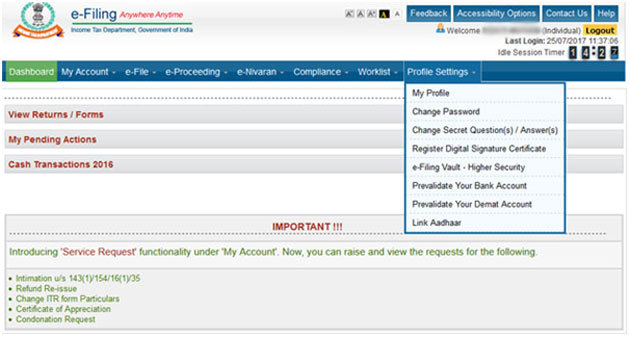
The screen will show the message, ‘Your PAN is already linked to Aadhaar number XXXX1234’.
In case your PAN is not linked to Aadhaar then a form will appear where you will be required to enter details – name, date of birth and gender as per PAN records & Next your Aadhaar number. Click on submit after entering the captcha code appearing on the screen.
Once submitted, a success message will be displayed on your screen.
For non- registered users
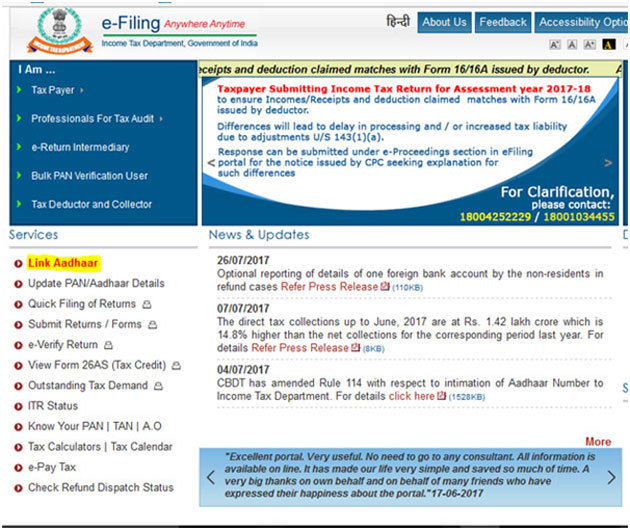
If you are not registered or don’t want to register yourself at the e-filing website, there is another way using which you can link your PAN and Aadhaar. A hyperlink has been provided at the homepage of the e-filing website and also on the income tax website http://incometaxindia.gov.in/Pages/default.aspx.
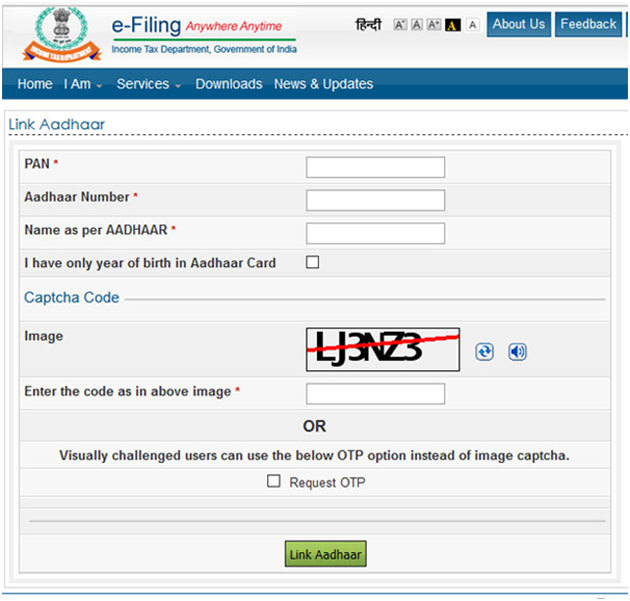
Just click on ‘Link Aadhaar’ on the e-filing website. A new form will appear where you are required to enter details – PAN, Aadhaar number, Name as per Aadhaar. ( See image below)
If your aadhaar card has only year of birth, then you must also tick the option: ‘I have only year of birth in Aadhaar card’
Enter the captcha code and click on submit. Once submitted successfully, a message will be displayed on your screen showing your PAN is successfully linked to Aadhaar.
Other Ways
1) By sending an SMS to PAN service providers
If you are unable to link your PAN and Aadhaar using the e-filing website of the department then there are other ways for linking PAN and Aadhaar.
Link your PAN and Aadhaar by sending a simple SMS. You can send an SMS to either of the PAN service providers namely NSDL e-Governance Infrastructure Limited or UTI Infrastructure Technology and Services Limited (UTIITL).
You can simply send a sms in a specific format using a keyword to the either 567678 or 56161.
The format is: UIDPAN<SPACE><12 digit Aadhaar><SPACE><10 digit PAN>
For example, if your Aadhaar number is 111122223333 and PAN is AAAPA9999Q. Then you are required to send sms to 567678 or 56161 as
UIDPAN 111122223333 AAAPA9999Q
2) Manual linking by filing up a form (Annexure-I)
As per the above mentioned notification, CBDT has provided for a manual method as well to ease the problems of taxpayers in case the person is unable to sort out the problem of mismatch in the data of PAN and Aadhaar through other methods.
You can visit a service centre of PAN service provider, NSDL or UTIITSL. You will be required to fill in the form ‘Annexure-I’ along with the supporting documents i.e. copy of PAN card and Aadhaar card.
Unlike online services, this service is not free of charge. An individual is required to pay a prescribed fee to them. The fee charged depends on whether while linking, correction is made in the PAN or Aadhaar details.
For any correction in the PAN details, the fee charged is Rs 110. On the other hand, for correcting Aadhaar details, the prescribed fee is Rs 25.
Biometric authentication is compulsory in case there is a major mismatch in data of PAN and Aadhaar.
Do Remember:
- In online methods, an Aadhaar OTP will be generated in case your name does not match that on your PAN card whereas your date of birth and gender matches. The OTP will be sent to the mobile number registered/linked to the Aadhaar number entered online. You will have to enter that OTP online to continue and complete the linking process.
- It is advised that in case there is a mismatch in the data of PAN and Aadhaar you get it corrected before trying to link the two numbers
I hope you must have understood the ways to link your PAN with AADHAAR. Do comment if you have any query.
Leave a Reply